

Excel VBA Certification Course
Transform your career with Tech Learniversity and Tech Vista Code’s Excel VBA Certification Course — gain the skills to automate repetitive tasks, build powerful macros, and unlock the full potential of Microsoft Excel through real-world VBA programming.
- Home Main
- Excel VBA Certification Course
Course Details
From: Tech Learniversity & Tech Vista Code
Start Day: Coming Soon
Project Duration: 30 Hours
Get in Touch with Tech Learniversity
Call us directly or email us!
Address Business
Hindustan C. Bus Stop,
Lal Bahadur Shastri Rd,
Gandhi Nagar, Vikhroli West,
Mumbai - 400079,
Maharashtra, India
Contact With Us
HR: (+91) 70217 89240
business@techlearniversity.com
hr@techlearniversity.com
Working Time
Holiday : Closed

Excel VBA Certification Course
The Microsoft Excel VBA for Beginners Course by Tech Learniversity and Tech Vista Code is designed to help learners master the fundamentals of VBA programming in Excel — from recording macros and writing basic code to automating complex, repetitive tasks and building user-friendly applications. Through this hands-on, instructor-led live program, you’ll learn to unlock Excel’s full automation potential and deliver smarter, faster, and more efficient solutions in the workplace.
Course Overview
Master Microsoft Excel VBA, the powerful automation language built into the world’s most widely used spreadsheet tool that transforms manual, repetitive tasks into fully automated, efficient workflows. This course by Tech Learniversity and Tech Vista Code covers every essential aspect — from understanding the VBA editor and writing basic macros to building loops, functions, and user-friendly applications. Whether you’re a working professional, student, or career changer, this training ensures you become job-ready for roles in data automation, reporting, finance, and business operations.
Course Type
Mode: Online Live Instructor-led Training
Course Objectives
By the end of this Microsoft Excel VBA Certification Course, you will:
– Understand the fundamentals of VBA programming, including the Visual Basic Editor, modules, and the structure of writing clean, efficient macro code in Excel.
– Record, edit, and write macros from scratch to automate repetitive tasks such as formatting, data entry, and report generation.
– Apply core programming concepts including Variables, Data Types, Loops, Conditions, and Functions to build dynamic and reusable VBA solutions.
– Interact with Excel objects such as Workbooks, Worksheets, Ranges, and Cells programmatically to control and manipulate data with precision.
– Design and build user-friendly UserForms and interactive dashboards that enhance the Excel experience for end users and business teams.
– Prepare for high-demand job roles in Data Automation, Reporting, Finance, MIS, and Business Operations across industries.
Duration
30 Hours
Requirements
– A laptop or PC with a minimum of 4GB RAM
– Microsoft Excel 2016 or later (Microsoft 365 recommended) with VBA/Macro support enabled
– A stable internet connection for live sessions
– Basic familiarity with Microsoft Excel (formulas, worksheets, and navigation)
Pre-requisites
– Basic understanding of Microsoft Excel (formulas, worksheets, and navigation)
– Familiarity with working in spreadsheets and managing data files
– Passion for automating tasks and improving workplace productivity
– No prior coding or programming background required
Target Audience
This program is ideal for:
– Excel Professionals & Reporting Analysts looking to automate manual, repetitive tasks using VBA macros
– Finance & Accounting Professionals seeking to streamline financial reports and data workflows
– MIS Executives & Data Entry Professionals wanting to eliminate manual work through automation
– MBA Students and Business Managers aiming to boost productivity with Excel automation
– Students & Fresh Graduates preparing for data-driven and automation-focused job roles
– Career Changers transitioning into data, reporting, finance, or operations from non-IT backgrounds
– Small Business Owners looking to automate invoicing, inventory, and business tracking in Excel
– Anyone aiming to become a confident, job-ready Excel VBA professional
Career and Future Prospects
Excel VBA professionals are in high demand across every industry. Successful learners can work as:
– VBA Developer / Excel Automation Specialist
– MIS Executive / Reporting Analyst
– Data Analyst – Excel & Automation
– Financial Analyst / Financial Reporting Specialist
– Business Analyst – Process Automation
– Operations Analyst
– Freelance Excel VBA Consultant / Macro Developer
Industries hiring: IT Services, Banking & Finance, Retail, Healthcare, Manufacturing, Consulting, and E-Commerce.
Designation/Title
– VBA Developer / Excel Automation Specialist
– MIS Analyst / MIS Executive
– Financial Reporting Analyst – Excel & VBA
– Business Process Automation Analyst
– Operations & Reporting Analyst
– Freelance Excel VBA Consultant / Macro Developer
Projects
Hands-on, business-driven VBA automation projects include:
Loan Calculator
Currency Converter
Interactive UserForm
Each project helps build a professional Excel VBA portfolio for employment readiness, interviews, and freelance opportunities.
Salary
₹3.5 LPA – ₹6 LPA
$55,000 – $90,000
CA$50,000 – CA$85,000
£32,000 – £60,000
AU$50,000 – AU$85,000
Features
– Real Industry Projects with Business Case Studies
– Live Instructor-Led Training Sessions (Recorded & Shared)
– Hands-on Labs and Practice Excel VBA Files
– 3 Real-World Automation Projects (Loan Calculator, Currency Converter & Interactive UserForm)
– Coverage of Core VBA Programming Concepts with Step-by-Step Guidance
– ISO 9001:2015 Certified Training Quality
Benefits
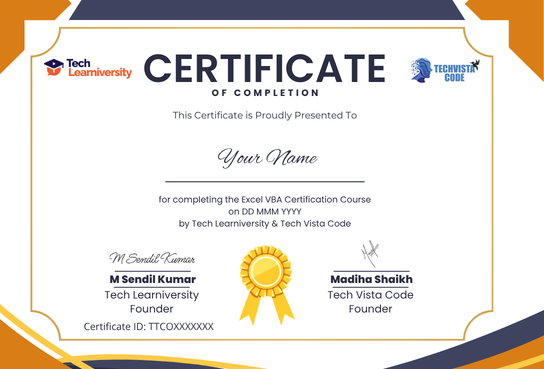
– Gain a co-branded globally recognized Certificate of Completion from Tech Learniversity and Tech Vista Code.
– Accelerate your career with job-ready Excel VBA projects and real-world automation solutions.
– Learn from certified trainers and industry consultants with hands-on VBA expertise.
– Build powerful macro-driven tools that eliminate manual work and boost workplace productivity.
– Access lifetime course materials and session recordings for continuous learning and reference.
– Open doors to global opportunities in data automation, reporting, finance, and business operations.
The Results
Become a Microsoft Excel VBA Professional capable of automating complex tasks, building macro-driven tools, and delivering smarter, faster business solutions in the workplace.
Get certified with a co-branded Certificate of Completion from Tech Learniversity and Tech Vista Code and stand out in top companies across finance, reporting, and operations.
Showcase a professional Excel VBA portfolio — featuring your Loan Calculator, Currency Converter, and Interactive UserForm projects — on LinkedIn and during job interviews.
Batch Details
Batch Start Date:
Batch End Date:
Batch Timings:
Batch Days:
Next Batch
Batch Start Date:
Batch End Date:
Batch Timings:
Batch Days:
Next Batch
Curriculum
1.Create a Macro
2.MsgBox
3.Workbook and Worksheet Object
4.Range Object
5.Variables
1.If Then Statement
2.Loop
3.Macro Errors
4.String Manipulation
5.Date and Time
6.Events
7.Array
8.Function and Sub
9.Application Object
10.ActiveX Controls
11.Userform
Certification of Completion
Tech Learniversity and Tech Vista Code is proud to uphold ISO 9001:2015 Certified Quality Management System standards, reflecting our strong commitment to excellence and continual improvement. By adhering to globally recognized best practices, we deliver courses and services with consistent quality, reliability, and transparency.
Our QMS framework ensures that every training module—whether in Excel VBA Certification Course—follows meticulous processes for development, review, and learner support.
Ultimately, this certification demonstrates our pledge to meet and exceed the expectations of students and industry partners, cultivating trust and long-term success in all our educational offerings.
Course Questions
Explore common questions about the course.
What types of courses does Tech Learniversity offer?
How do I enroll in a course?
Are there any prerequisites for the courses?
What is the duration of the courses?
Do you offer job placement assistance?
Can I attend workshops and events?
Is financial aid available?
How can I contact Tech Learniversity for further questions?
What is the learning format of the courses?
How do I provide feedback on my learning experience?
Services Questions
Lorem ipsum dolor sit amet, consectetur adipiscing elit. Proin tincidunt tellus
What skills will I gain from the bootcamp?
How does the job guarantee program work?
What types of career-enhancing courses do you offer?
What is included in the Career Pro X program?
How does the Elevate X program benefit my professional growth?
What is the format of the Engage X program?
What certifications can I prepare for through your courses?
What educational resources do you provide for school students?
How can Tech Learniversity support college students?
What types of courses are available for university students?
What specialized training does your institute offer?
How can Tech Learniversity assist corporate training needs?
What types of workshops can I expect?
How does the customized 1 to 1 training work?
What is included in the customized group training programs?
What does the interview preparation course entail?
Didn’t Find the Answer? Ask us Questions
Call us directly or email us!
Address Business
Hindustan C. Bus Stop,
Lal Bahadur Shastri Rd,
Gandhi Nagar, Vikhroli West,
Mumbai - 400079,
Maharashtra, India
Contact With Us
HR: (+91) 70217 89240
business@techlearniversity.com
hr@techlearniversity.com
Working Time
Holiday : Closed
Frequently Asked Questions
What skills will I learn in Tech Learniversity’s and Tech Vista Code's Advanced Excel Certification Course?
Do I need prior coding or math knowledge to join the course?
How Does This Course Help Non-IT Professionals Transition Into High-Demand Excel VBA Roles?
What career support does Tech Learniversity and Tech Vista Code provide upon completion?
– VBA Developer / Excel Automation Specialist
– MIS Analyst / MIS Executive
– Financial Reporting Analyst – Excel & VBA
– Business Process Automation Analyst
– Operations & Reporting Analyst
– Freelance Excel VBA Consultant / Macro Developer